
Do you want a system where your sales team can answer every lead instantly?
What if your system could qualify prospects, schedule meetings, and log insights into your CRM automatically?
Welcome to the future of sales.
By the end of this article, you’ll have a clear roadmap for building a custom sales automation system powered by a voice AI API.
What Is a Voice AI API and Why Does It Matter for Sales Automation?
Consider the telephonic customer support system. In this system, the user has to ring the phone until someone answers.
But instead of that, suppose you have an intelligent voice agent powered by AI that answers the call. Along with generic replies, it also understands complex queries, engages in a natural conversation, and handles actions such as booking a demo.
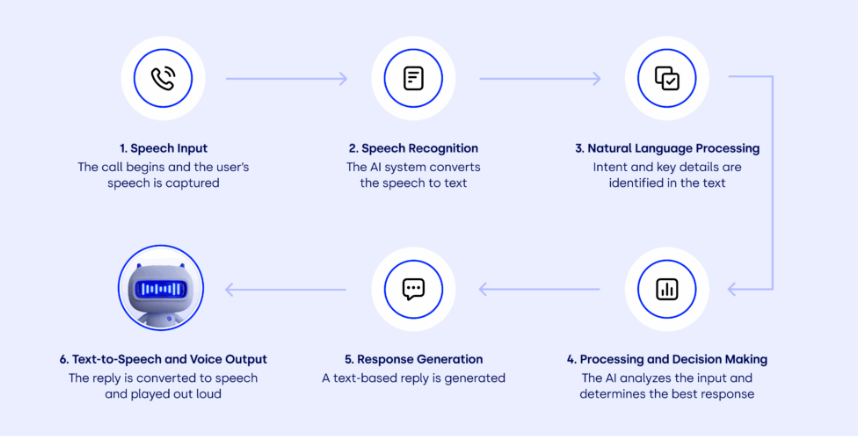
That’s what a voice AI API is capable of doing. It provides developers with the tools to power speech recognition, natural language understanding, and voice responses inside the apps or automation workflows.
Voice automation provides an edge to your organization over your competitors. According to industry insights, more than 70% of sales teams utilize call automation and report call efficiency gains of up to 50%.
When you integrate the call log data with CRM data, you can create a system that never forgets to follow up, never misses a lead, and never gets tired of repeated questions or calls.
Why Use a Voice AI API: The Real-World Sales Benefits
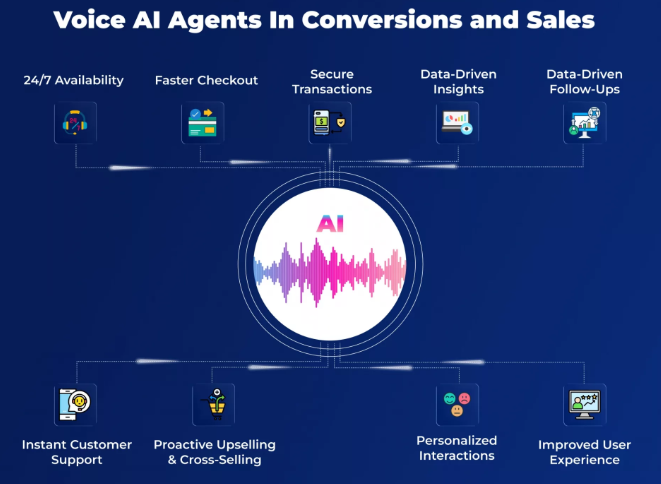
Let’s be honest: Manual calling and administrative tasks are a big drain on sales teams’ energy. A sales rep might spend half their day dialing, logging notes, and chasing schedule confirmations instead of closing deals.
Here’s how a voice AI API changes the game:
1. Response Speed That Converts
Most customers buy from the brand that is quick to respond to their inquiries. AI voice agents answer instantly. You can dramatically increase your speed-to-lead, which can improve your conversion rates.
2. Automation Without Additional Headcount
Generally, more outreach means hiring more people. This can be reduced by automation. Smart voice systems scale outreach without linear cost increases. For example, a SaaS company scaled from 500 to 2,000 monthly leads by using voice automation without adding new sales reps.
3. Consistent Messaging and Follow-Ups
Human reps vary by mood, energy, and timing. Unlike this, voice AI runs on consistency. That’s how many businesses see an improvement in pipeline quality and follow-up completion rates without manual intervention.
4. More Time for Human Strategy
When your team isn’t chasing reminders and typing call notes, they can focus on strategic selling and relationship building. A system that frees human time this way delivers better ROI over time.
How to Build Your Sales Automation With a Voice AI API
1. Choose the Right Voice AI API
The foundation of your sales automation depends on the voice AI API you choose. This API determines how naturally your system understands callers, how human-like the responses sound, and how reliably it handles high call volumes.
A superior voice AI API should support real-time speech recognition. Based on the speech, the system should be able to detect the intent of the person and accordingly customize the responses. Also, the system should ideally integrate with CRM data.
For businesses that already rely heavily on phone-based sales or inbound inquiries, starting with a solution such as an AI receptionist makes sense. For example, the Nextiva AI receptionist shows how voice AI can answer calls instantly, route conversations intelligently, and maintain a professional brand tone without sounding robotic.
This technology brings lower long-term costs compared to a human receptionist. Also, when set up strategically, AI receptionists give consistent and reliable performance.
While your implementation may be custom-built, studying such solutions will help you understand what “good” voice automation should feel like from a customer’s perspective.
What to evaluate before selecting an API:
- Speech accuracy across accents and noise levels
- Support for inbound and outbound calls
- Custom voice and script control
- Scalability as call volume grows
- CRM and webhook integration options
2. Get Your API Keys and Set Up Access
Once you’ve chosen your voice AI API, the next step is enabling secure access. API keys act like digital credentials that allow your application to communicate with the voice system. Without proper setup here, even the best voice technology won’t function reliably.
Key setup actions include:
- Generating API keys from the provider dashboard
- Storing keys securely using environment variables
- Configuring phone numbers and call endpoints
- Setting permissions for call handling and data access
3. Create Voice Scripts That Sound Human
Your voice scripts define how your AI speaks, listens, and responds. This is where sales psychology meets technology. Instead of keeping rigid prompts, such as if the customer asks a particular question, answer in this particular way, scripts should feel conversational and adaptable. The AI should respond naturally to different customer intents.
Quality scripts focus on clarity and keep the conversation interactive. The response to each question should guide a user properly through the next steps.
Best practices for script writing:
- Use simple spoken language
- Ask one question at a time
- Anticipate common objections or pauses
- Include polite confirmations before actions
Example:
A voice AI for B2B says, “Please state the purpose of your call.” A more natural script is: “Are you calling to book a demo, ask about pricing, or speak to our team?”
That small change can significantly improve engagement and completion rates.
4. Build Smart Call Flows
Call flows define what happens after each response. Well-designed call flows keep conversations interactive.
At this stage, you map how the AI reacts when someone asks for pricing, wants a callback, or isn’t ready to buy. Each path should lead to a clear outcome.
Common call flow paths include:
- Inbound lead qualification
- Outbound follow-up calls
- Appointment scheduling
- Live agent hand-off
Example:
If a caller says, “I’m just exploring,” the AI can tag them as an early-stage lead. It can also schedule a follow-up call instead of persuading them to take a demo.
5. Integrate the Voice AI API With Your CRM
Automation becomes powerful when you collect real-time data accurately. CRM integration ensures that every conversation record, deal stages, and activity logs are updated without manual data entry. Also, ensure that this voice AI data is secure.
CRM integration typically includes:
- Creating or updating lead records
- Logging call summaries and transcripts
- Updating deal stages based on intent
- Triggering follow-up tasks
6. Set Triggers and Automation Rules
Triggers decide when the voice AI takes action. These rules turn passive systems into proactive sales machines. For example, when a user submits a form, this means they are interested in knowing further details. Therefore, triggering an outbound call is a great move here.
Popular trigger types:
- New lead creation
- Missed inbound call
- Demo request submission
- No response after follow-up
7. Test the System Before Full Launch
Before going live, testing is critical. This step will help identify the errors that AI is causing. As a result, you can solve problems, such as meaningless responses and not keeping your brand voice and tone consistent, early.
Testing ensures the AI behaves as expected under real-world conditions.
Run internal test calls, simulate different responses, and review call logs carefully. Small refinements at this stage can prevent customer frustration later.
What to test:
- Speech recognition accuracy
- Call flow logic
- CRM data syncing
- Failover and hand-off behavior
8. Launch, Monitor, and Improve Continuously
You need to monitor performance metrics and refine scripts, triggers, and flows based on the real-time data.
Metrics worth tracking:
- Call answer rate
- Lead qualification rate
- Appointments booked
- Hand-off success to human reps
Turn Voice AI Into a Scalable Sales Engine
With voice AI technology, your brand can respond to leads instantly and solve their queries at any moment.
To implement voice AI technology in your business, choose the right Voice AI API, set up smart call flows, integrate with your CRM, and constantly optimize the system.
Voice AI helps you create a system that works 24/7 and supports your sales team.
If you want expert help in implementing voice AI and other AI tools tailored to your business, connect with Quarule. We help you move from idea to execution.