
Remote team connectivity has a direct impact on your overall performance. Companies that invest in a strong internal communication platform consistently see higher productivity across their distributed teams. Studies show that teams using structured digital connection platforms achieve significantly better participation and more reliable schedule adherence compared to those relying on scattered tools.

Even so, many managers struggle to recreate the unity and collaboration that once developed naturally in shared office environments. The shift to remote or hybrid work often reveals gaps in communication habits, accountability, and daily team alignment.
This guide will help you strengthen those areas and create communication practices that truly support your team. You will learn practical strategies for setting clear expectations, improving transparency, and using technology to reinforce accountability. Organizations that follow these approaches often report notably higher retention rates among remote employees.
If you are ready to improve the way your team works together, the following steps will show you exactly where to begin.
Step 1: Set Clear Communication Norms for Remote Teams
Clear communication norms are the foundations of effective remote team connectivity. Organizations lose an estimated $12 billion annually because of unclear communication expectations that lead to inefficiencies and productivity challenges. Your remote team needs explicit guidelines about information flow throughout your organization.
Define when and how to use each tool
For urgent, time-sensitive updates that need guaranteed visibility, some teams also use Microsoft Teams text messaging to reach employees directly when they may not be active in email or chat. Remote teams excel when team members know which channels suit specific types of communication. A detailed communication charter should outline:
- Which platforms suit urgent matters versus routine updates
- Expected response times for different communication channels
- Guidelines for documentation and knowledge sharing
Multiple platforms with overlapping features reduce efficiency. Workers spend nearly 20 hours weekly on digital communication tools, while 45% of employees report reduced productivity due to poor communication practices. Your team needs simplified tools that serve their specific needs.
Balance synchronous and asynchronous communication
Leading remote organizations recommend asynchronous communication for most employee interactions. Companies can lose up to $1 million yearly in productivity due to unwanted interruptions. This makes planned communication vital.
Your remote team’s connectivity should follow these guidelines:
1. Schedule synchronous communication (video calls, real-time chats) for:
- Building relationships between distanced coworkers
- Discussing sensitive topics
- Complex project planning
- Brainstorming sessions
2. Employ asynchronous methods (email, shared documents, recorded videos) for:
- Information that doesn’t need immediate attention
- Updates that benefit from thoughtful responses
- Documentation that needs future reference
Step 2: Build Trust and Transparency Digitally
Trust forms the foundation of successful remote team operations. Remote teams can experience a 23% increase in feelings of isolation and disconnection without deliberate efforts to build trust digitally. Your top priorities as a remote team manager should include creating transparency and psychological safety.
Encourage open sharing of updates and blockers
Communication that runs on transparency needs consistency. Weekly or monthly leadership updates help keep everyone informed about goals, challenges, and achievements. The team needs dedicated channels where members can openly share their roadblocks without fear of judgment.
You can implement:
- Anonymous feedback systems where team members can voice concerns safely
- Regular structured check-ins that focus on removing barriers
- Recognition programs that reward knowledge sharing and transparency
Transparency works both ways. Team members feel comfortable sharing their challenges when managers openly admit their own.
Use video calls to humanize interactions
Digital face-to-face interactions boost connection substantially in remote settings. Studies reveal that 55% of our communication is visual, which explains why video creates stronger bonds between distributed team members.
Important meetings need camera use to capture facial expressions and non-verbal cues. Teams should respect that camera-off moments might be needed occasionally. Teams using video messaging report substantially higher levels of camaraderie and reduced feelings of isolation.
Promote psychological safety in remote settings
Team members take interpersonal risks without fear of negative consequences when psychological safety exists. Remote work makes this harder since physical interactions decrease.
Start by showing vulnerability yourself. Teams follow leaders who admit mistakes or ask for help. Replace blame with curiosity when addressing challenges. Ask questions like “What prevented you from completing this part of the project?” or “What additional resources would help you next time?” instead of assuming negative intent.
Psychological safety should become a regular topic of discussion in your team. These conversations create a foundation for continuous improvement and stronger remote team connectivity when normalized.
Step 3: Use Technology to Support Autonomy and Accountability
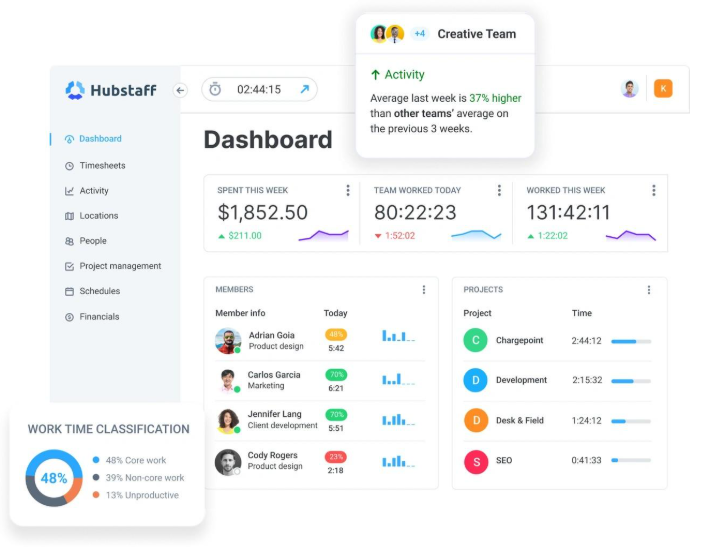
Technology gives remote teams the tools to balance independence with results-driven performance. The right tech tools help teams stay autonomous without losing accountability—a vital balance needed for remote team connectivity. For hybrid teams that still use shared offices occasionally, using a visitor management system also improves accountability by tracking on-site presence, access, and movement without adding administrative overhead.
Let teams manage their own schedules and swap shifts
Teams work better when they control their schedules. Self-service scheduling tools let team members check upcoming schedules, ask for time off, trade shifts, and update availability from one app. Remote workers can better manage their work and personal life with this visibility, so scheduling conflicts and sudden changes decrease.
Teams that use self-service scheduling show substantially higher engagement and stick to their schedules better. These tools bring order to scheduling chaos and keep everyone accountable.
Shared dashboards have changed how remote teams track progress. They replace scattered updates with a clear view of team activity. These visual tools show immediate activity data, who’s working, which tools teams use, and where work might be stuck.
Shared dashboards offer these benefits:
- Quick view of workloads that helps prevent burnout
- Clear metrics that build trust instead of micromanagement
- Visual cues that make progress tracking simple
Automate routine updates and reminders
Automation removes manual tasks that break concentration. Slack and Microsoft Teams can schedule meetings, send reminders, and share important updates automatically. Teams can move tasks forward without waiting for different time zones.
Teams focus on core work instead of administrative tasks when repetitive work gets automated. This creates optimized workflows where accountability happens through systems rather than surveillance.
Step 4: Maintain Engagement and Connection Over Time
Regular team activities are the missing piece that determines long-term success for remote teams. Research shows that remote employees feel more anger, sadness, and loneliness than their office counterparts, even when they’re highly engaged. Your remote team might disengage without the right connection strategies, no matter how good your communication tools are.
Host regular virtual team-building activities
The numbers tell a compelling story – workplace friendships boost mental health (78%), engagement (83%), and job satisfaction (81%). Remote teams need these connections built intentionally since they don’t happen naturally.
A consistent rhythm of engagement works best:
- Weekly: Quick virtual coffee breaks or 15-minute social check-ins
- Monthly: Themed activities like trivia contests, virtual escape rooms, or online games
- Quarterly: Larger virtual events such as talent shows or team challenges
Social connections matter beyond just having fun – they help solve the remote work isolation paradox. Studies reveal that remote workers report higher engagement yet lower life satisfaction. Regular team activities help bridge this gap effectively.
Team members should connect with colleagues outside their immediate work groups. These relationships naturally spark better collaboration and keep teams from becoming isolated silos.
Note that “social time is not wasted time”. Your remote team’s emotional bonds grow stronger through regular engagement activities, despite the physical distance between team members.
Strengthen Connectivity Infrastructure for Distributed Teams

Your distributed team’s physical infrastructure serves as the backbone of all remote operations. Even the strongest communication practices cannot succeed without resilient connectivity systems that support daily work. Guidance provided through SD-WAN experts helps teams achieve stronger network stability, improved traffic management, and secure access across distributed environments.
Team members should use wired connections whenever possible to ensure optimal internet connectivity. Those who must use wireless setups need dual-band or tri-band routers that support Wi-Fi 6. This setup delivers faster speeds and handles multiple devices better.
Your infrastructure needs these vital improvements:
- Enable Quality of Service (QoS) settings to prioritize video calls and work applications over other network traffic
- You should think about split-tunnel VPN configurations that allow Microsoft 365 and other remote work traffic to bypass the VPN. This improves performance while you retain control of security
- Standardize cloud collaboration tools to reduce tool sprawl – Microsoft Teams, Google Workspace, or similar integrated suites minimize administrative work and confusion
Geographic factors play a crucial role for distributed teams. Local DNS resolution and internet egress points help team members connect to the closest service entry points and dramatically reduce latency. Homes without multiple physical connections can implement a broadband/fixed wireless strategy to meet uptime requirements.
A Look Ahead for Connected Teams
Strong remote connectivity grows through consistent habits, reliable tools, and a shared commitment to clarity. When teams communicate with intention, trust strengthens, and collaboration becomes easier even across long distances. The practices outlined in this guide give managers a clear path toward healthier digital workplaces where people feel supported and understood.
Every improvement in communication raises the quality of decision-making and teamwork. With the right structure in place, remote employees gain confidence in their interactions and managers gain a clearer view of team needs.
Meaningful change takes time, yet each small adjustment shapes a more resilient team culture. As you refine expectations, adopt helpful tools, and nurture relationships, you create a setting where engagement thrives. Strong connectivity is not a single achievement. It is a continuous practice that grows alongside your team.
Your next step is simple. Choose one improvement from this guide and begin applying it today. Each step forward strengthens the foundation for long-term success and a more connected remote workforce.


