
Have you ever wondered how influencers have such mind-blowing photos?
One creator tried everything, including fancy gear and expensive apps, but still looked basic. Then came ChatGPT photo editing prompts. Boom. Viral-level edits by using a few prompts.
People started using clever prompts. Basic photos turned into eye-catching edits. The trick? Knowing how to talk to AI. Photo prompts made it easy.
Over 34 million AI images are made every day. As of 2024, the AI image editors and generators were the most rapidly expanding category of G2, with an annual growth rate of 441 percent.
ChatGPT photo editing prompts connect your ideas with what AI can do. These written instructions help AI improve or entirely remake your photos with pro-level results.

Understanding the Power of AI Image Enhancement
AI image prompts have totally changed digital photography. Now, anyone can get pro-level edits using an AI image creator no need to learn software or spend years practicing. Just tell the AI what you want and get great results.
AI reads your words and knows what to fix in a photo. A good prompt is like a cheat sheet for editing. You say what you want. The AI makes it happen.
Core Benefits of AI-Powered Photo Enhancement:
- Accessibility: No technical expertise required
- Speed: Transform images in minutes, not hours
- Consistency: Maintain style across multiple images
- Cost-Effectiveness: Eliminate expensive editing software subscriptions
- Creative Freedom: Experiment with unlimited styles and effects
The global AI image generator market reached USD 349.6 million in 2023, and analysts project it will climb to USD 1,081.2 million by 2030, growing at a CAGR of 17.7%. It indicates massive industry adoption and investment in these technologies.
What are Some Trending Prompts for ChatGPT Photo Editing in 2025?
With cinematic flair and polished aesthetics leading the charge, 2025’s most viral photo editing categories are redefining visual storytelling.
Cinematic Image Enhancement:
- Turn this photograph into a muted cinematic palette with dramatic shadows, extreme light contrast, and vintage atmosphere.
- Use luxury fashion, editorial styling, and professional lighting with minimal background and glossy finish.
Artistic Style Transformations:
- Turn it into an oil painting format with brush strokes, thick textures, and warm ambient lighting.
- Use watercolour effect lightness with smooth edges, translucent layers, and paper texture works of art.
Environmental Change:
- Change the location of the photo: not a room, but a summer park with soft sunlight, green trees, and blurry lines. Make the face look softer with gentle light.
Trending Photo-Editing Prompts You Must Try (Detailed)
Prompt 1
Make this photo look cinematic with moody tones
Creators often use this to turn casual shots into something straight out of a movie. Try it when you want that dark, dramatic vibe — think deep shadows, teal highlights, and a little grain. Works best for portraits or city nightscapes.
Prompt 2
Turn this into a soft pastel aesthetic
Perfect for those who love dreamy Instagram feeds. Add muted pinks, lavenders, and soft blues. It instantly makes product shots, flat lays, or lifestyle pics look delicate and Pinterest-worthy.
Prompt 3
Give this photo a vintage film look
Because nostalgia never goes out of style. Add a warm tint, slight fade, and dust/grain. Use this on travel photos or candid portraits for that 90s disposable camera feel.
Prompt 4
Make this look like digital art/painting
This prompt is huge on TikTok right now. Your ordinary photo transforms into an art piece — brushstroke effects, smooth textures, and surreal vibes. Perfect for profile pictures or storytelling posts.
Prompt 5
Enhance colors and make it look golden hour
Even if you didn’t catch the sunset, you can fake it. Warm orange tones, glowing highlights, and softer shadows give your photo that magical golden glow. Great for selfies, beach shots, or romantic edits.
Prompt 6
Turn this into a whimsical fantasy scene
Creators love going over-the-top with fairytale vibes. Think floating lights, misty forests, glowing animals, or magical sparkles. It’s playful, attention-grabbing, and works amazingly for reels or creative campaigns.
Pro Tip:
When using prompts, don’t just copy and paste. Add details — for example, instead of “make this cinematic,” try “make this cinematic with neon lights and a Blade Runner vibe.” The more specific you get, the more unique your edit will look.
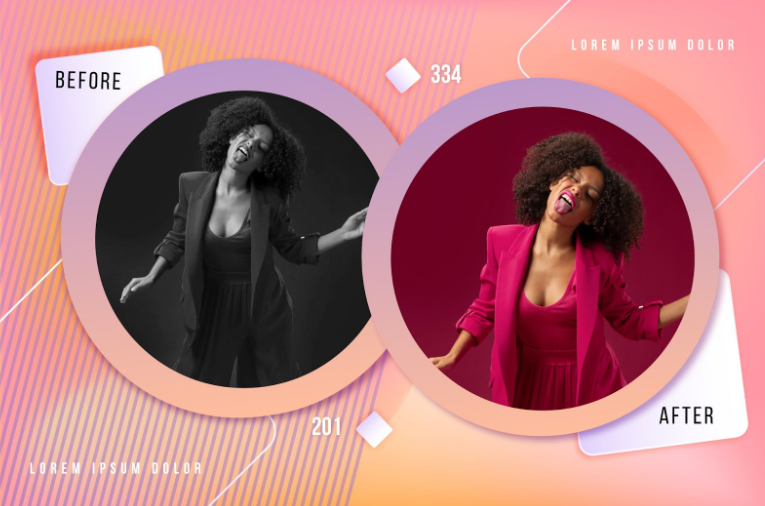
Which ChatGPT Photo Editing Prompts Work Well for Enhancing Portraits?
The enhancement of portraits is a defined prompt of ChatGPT applied to photo alteration processes to maintain the natural beauty with professionalism.
The most effective portrait prompts focus on lighting, skin refinement, and background optimization.
Professional Portrait Enhancement Prompts:
Lighting Optimization:
- Enhance facial lighting with soft, diffused illumination that reduces harsh shadows while maintaining natural skin tones.
- Apply a studio-quality lighting setup with key light and subtle rim lighting for professional headshot quality.
- Create dramatic portrait lighting with Rembrandt lighting technique, emphasizing facial structure.
Skin and Feature Enhancement:
- “Professional skin retouching while preserving natural texture – reduce blemishes, even skin tone, maintain authentic appearance”
- “Enhance eye clarity and brightness without artificial effects, subtle color enhancement, natural sparkle”
Background and Composition:
- Replace busy background with elegant, blurred bokeh effect in contrasting colors
- Create a professional studio backdrop with gradient lighting and a minimalist aesthetic.
With the right prompts in place, it is time to see what tools can be used to bring them to life.
Which Portrait Enhancement Tools Should You Choose?
|
Tool Name |
Best For |
| ChatGPT + DALL-E |
Natural portrait enhancement and style transformation |
|
Artistic portrait interpretations and creative variations |
|
|
Technical control over specific facial features |
|
|
Professional-grade portrait editing with fine control |
|
|
Commercial portrait work with licensing clarity |
And now that you have your toolkit ready, you can discover how your photo edits can be elevated to the next level with ChatGPT prompts.
How Can ChatGPT Prompts Improve Photo Editing Results?
Strategic AI image prompt examples help you get better edits by giving precise and useful instructions that guide how AI works. The trick is knowing how to write prompts that get strong and steady results.
Essential Prompt Structure Elements:
Technical Specifications:
- Resolution Requirements: Create high-resolution output suitable for print.
- Quality Standards: Professional photography quality with sharp details.
- File Format Preferences: Optimize for web display with balanced compression.
Style Descriptions:
- Lighting Details: Soft, diffused lighting with warm color temperature.
- Color Palette: Muted earth tones with subtle golden highlights.
- Artistic Influence: Inspired by Annie Leibovitz’s portrait photography style.
The difference between good and great edits often lies in how well your prompt works. Let’s dive into why that matters.

Why Should Content Creators Master AI Image Prompts?
Knowing how to use strong AI image prompts gives you an edge in today’s visual world. Mastering prompt examples isn’t just smart, it unlocks a whole new level of creative freedom and business efficiency. Let’s break down the key benefits.
Creative Benefits:
- Unlimited Experimentation: Test countless styles without resource constraints
- Instant Rework: Quickly refine concepts based on feedback
- Style Consistency: Maintain brand visual identity across content
- Professional Quality: Achieve commercial-grade results without expensive equipment
Business Advantages:
- Cost Reduction: Eliminate photography and editing service expenses
- Time Efficiency: Produce content in minutes instead of days
- Scalability: Generate multiple variations simultaneously
Emerging Trends for 2025:
- Mobile Integration: Professional editing capabilities on smartphones
- Voice-to-Visual: Spoken prompt conversion to image modifications
- Collaborative AI: Team-based editing with AI assistance
- Ethical Guidelines: Industry standards for responsible AI image creation
With all these creative perks and business wins, learning how to use AI image prompts is a smart move for any content creator.
Conclusion
ChatGPT photo editing prompts changed the game. Now, anyone can edit like a pro—no tech skills needed. AI image tools are booming fast. Learning prompt tricks helps creators stand out and grow.
Clear instructions and creative space are necessary to achieve great AI edits. The most effective prompts are those that are sharp and broad at the same time. That’s how you get edits that feel real, not overdone.
Whether you’re fixing selfies, trying cool edits, or making brand visuals, good prompts matter. Test, tweak, repeat. That’s how you stand out online.
As AI continues to expand, you can keep your images razor-sharp and fascinating by learning the new ChatGPT prompt for photo editing and new AI image prompt examples. The future is in the hands of creators who will understand how to collaborate with AI to implement their ideas.
Want to level up your photos with AI? Try these proven ChatGPT photo editing prompts and see what cool ideas you can create.
FAQs
Use specific ChatGPT photo editing prompts like “enhance portrait lighting, smooth skin texture, add professional studio background” for best results.
Popular AI image prompts include movie-style portraits, old-school looks, pro lighting effects, and cool art-style changes for social media posts.
To use an image prompt, write a clear description of the picture you want. Drop it into an AI tool like Midjourney or imageprompt.org. Try different words and details to get the best results.
Be specific. Don’t just say “a cat”, say “a fluffy white cat with blue eyes on a sun-kissed corner.”
To edit a photo in ChatGPT, you must upload a photo, then press the edit button, and then choose what part of the photo you want to change. Then write whatever you want to change, e.g., delete something, add a new fact, or alter the style. ChatGPT will change the picture on your behalf.


